Your business isn't missing information. It's missing clarity.
VELA pulls your revenue, clients, projects, and systems into one CEO view, and helps you make sense of it, so you can decide with the full picture in front of you.
One payment. Yours for life. No subscription.
Watch the tourLifetime pricing closes in
days
hrs
min
sec
Available Oct. 26 to Nov. 5. Regular pricing is $39/month or $397/year.
Connects with the tools you already use
One place to see it, understand it, and run it.
See
See everything in one view.
Revenue, expenses, pipeline, clients, projects, and your calendar, pulled together so you're not piecing the picture together from five tabs.
Understand
Understand what it means.
Trends, capacity meters, and alerts show what's shifting in your numbers. When something does, VELA explains what it found and where to look next.
Run
Run the business from it.
Turn what you see into a plan. Set your next 12 weeks, assign the work, and build the routines and documentation that keep the business moving.
The difference
Other tools help you manage the work. VELA helps you run the business.
Dubsado manages your clients. ClickUp manages your tasks. VELA manages none of that. This is where you run the business. See your numbers. Build your systems. Make real decisions. Not another tool to juggle. The one that sits above all of them.
VELA's features.
A walkthrough of the hub, from Morning Brief to Systems Hub.
See what's new below.
What's inside.
Every section connects to the others, so the number you see in one place is the same number everywhere.
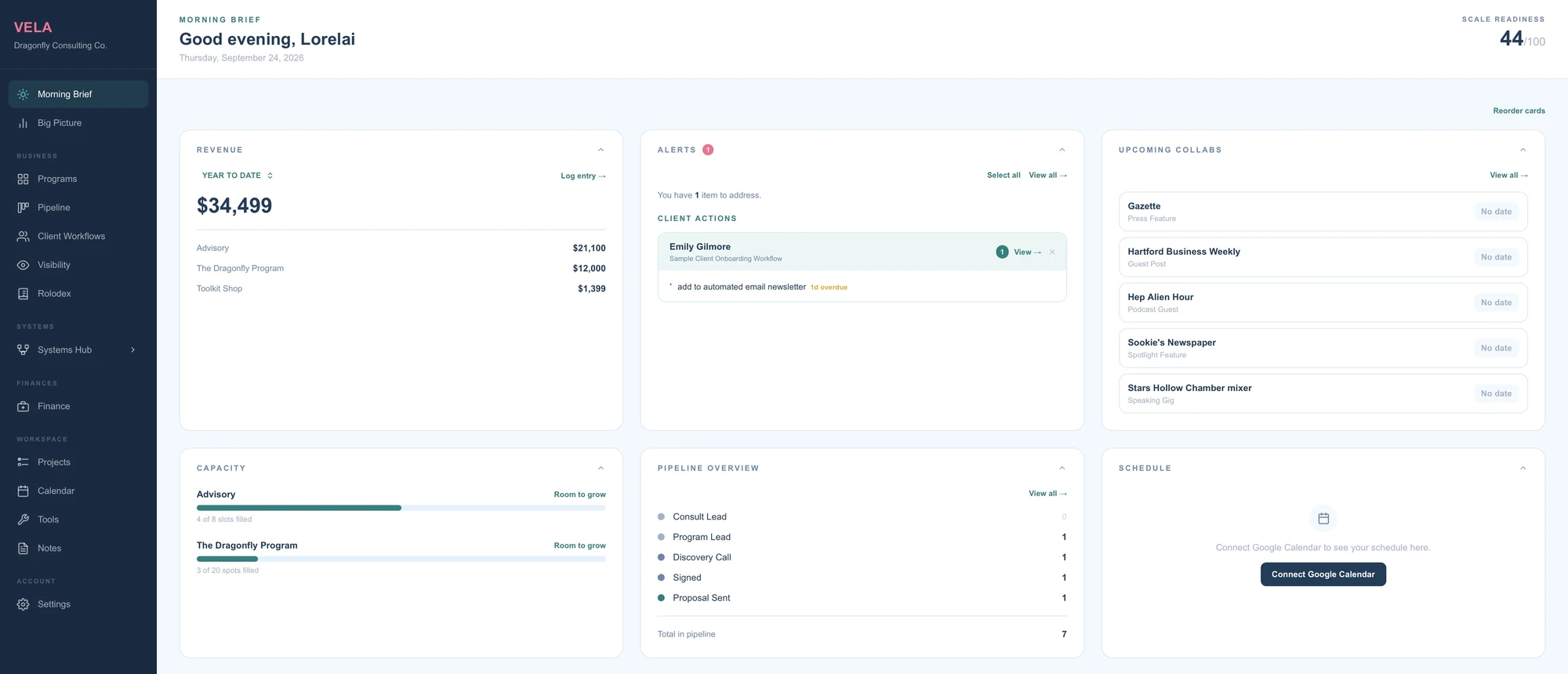
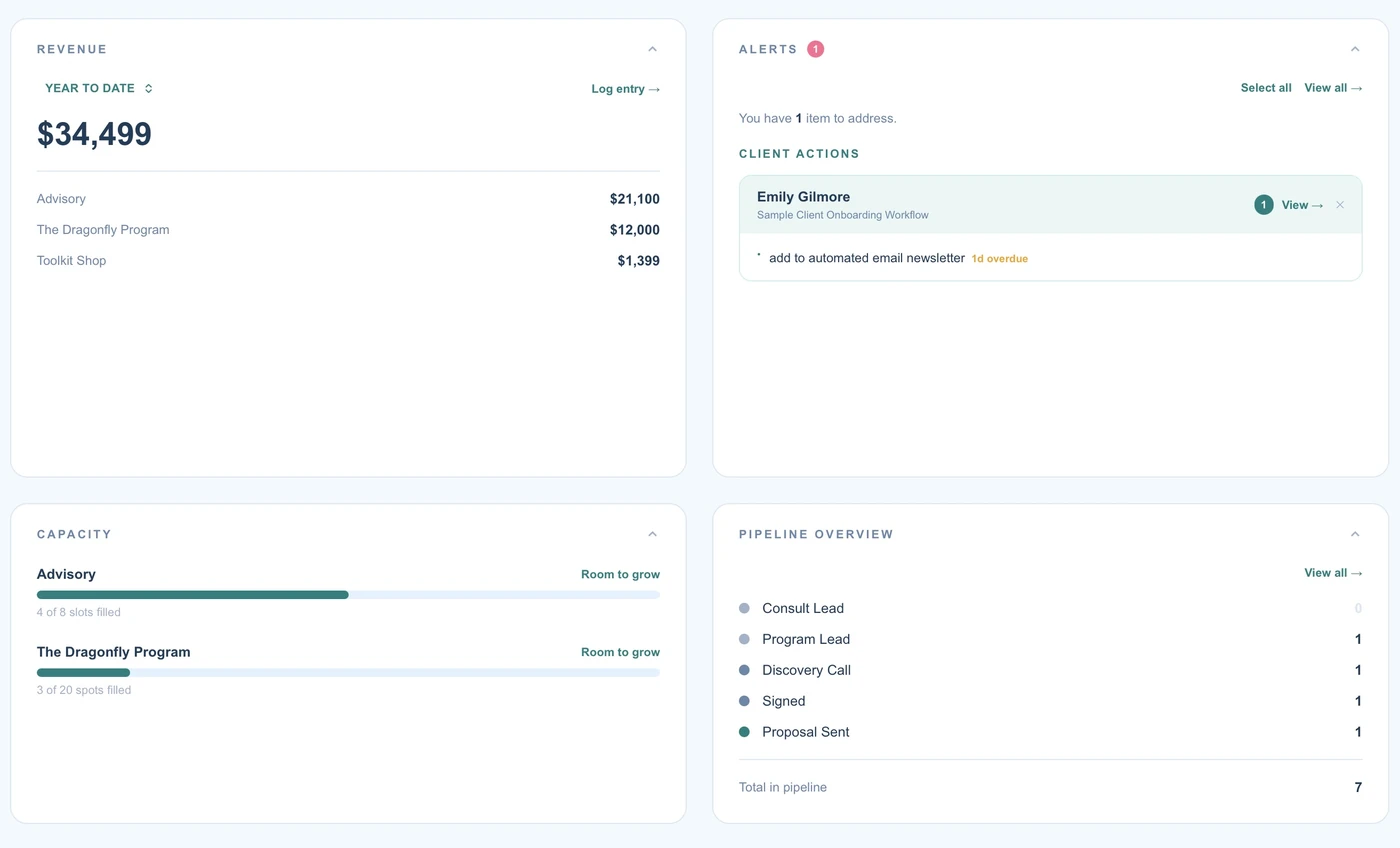
Morning Brief
Start every day knowing where you stand.
Open VELA and your Morning Brief is ready. This month's revenue against your goal, how full each of your services is, the clients who need attention, and what's on your calendar today.
- Revenue progress against your monthly goal
- Capacity meters for each of your services
- Alerts for contracts ending, follow-ups due, and workflow steps waiting on you
- Today's and tomorrow's Google Calendar events
- A live notification the moment a Stripe sale or a new Kit subscriber comes in
- Reorder the cards to fit how you work
Finance
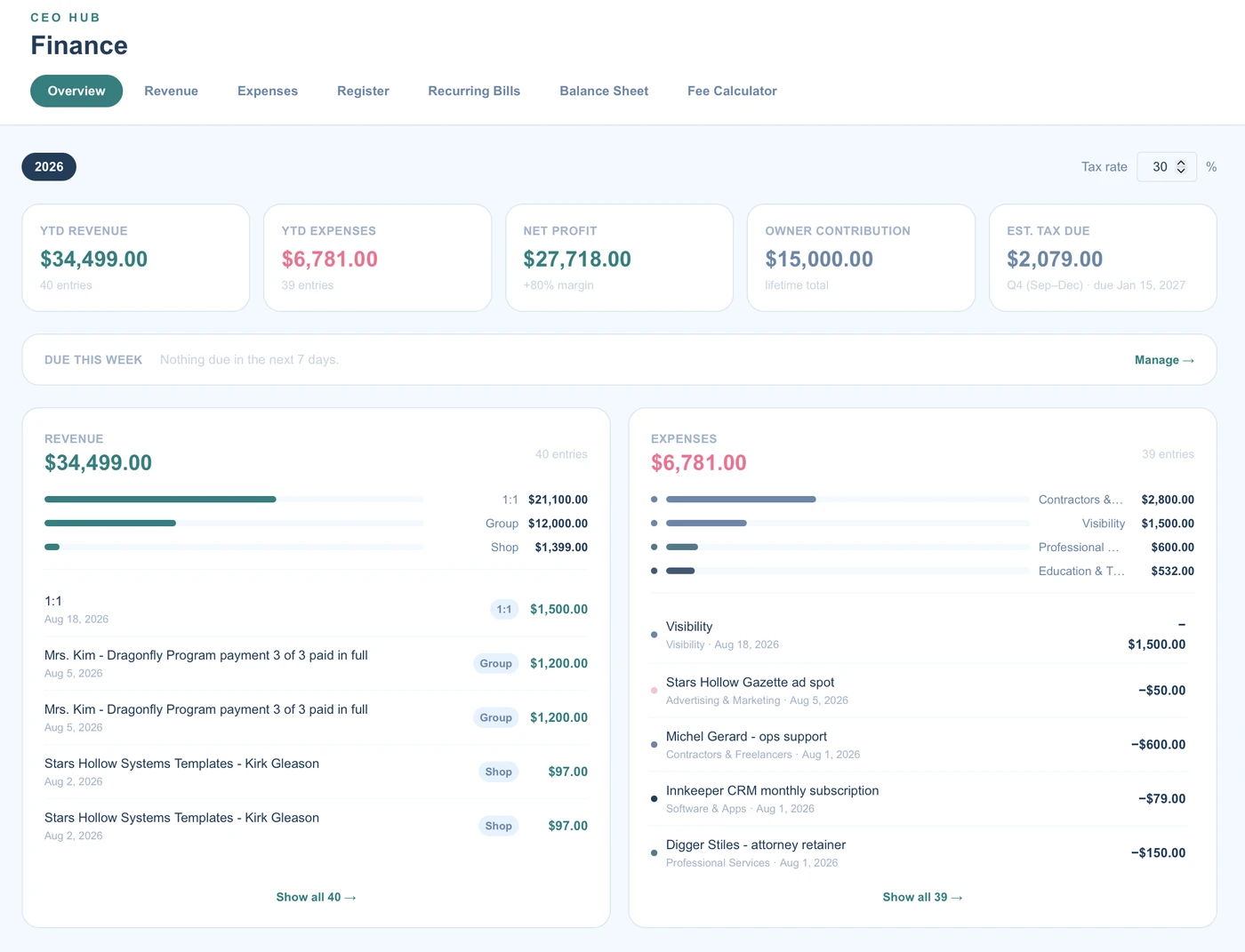
Know what you earn, spend, and keep.
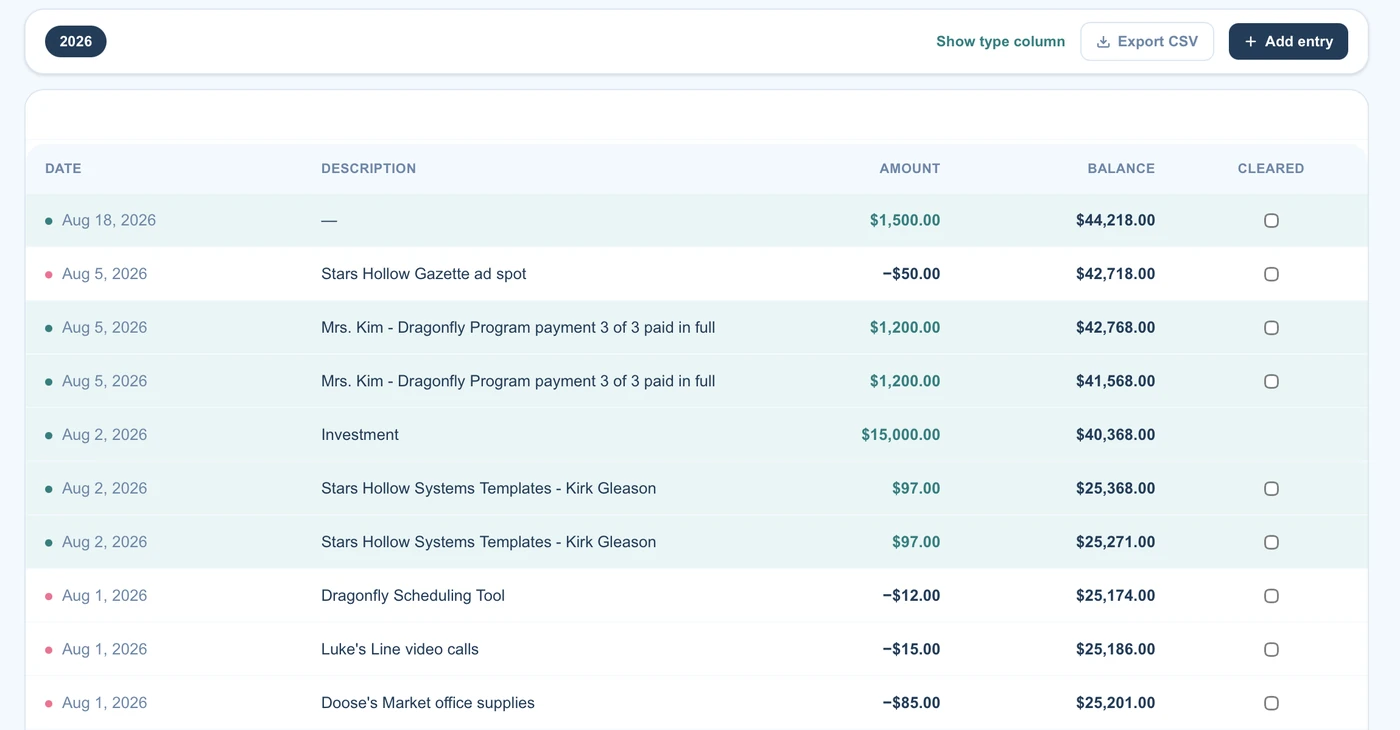
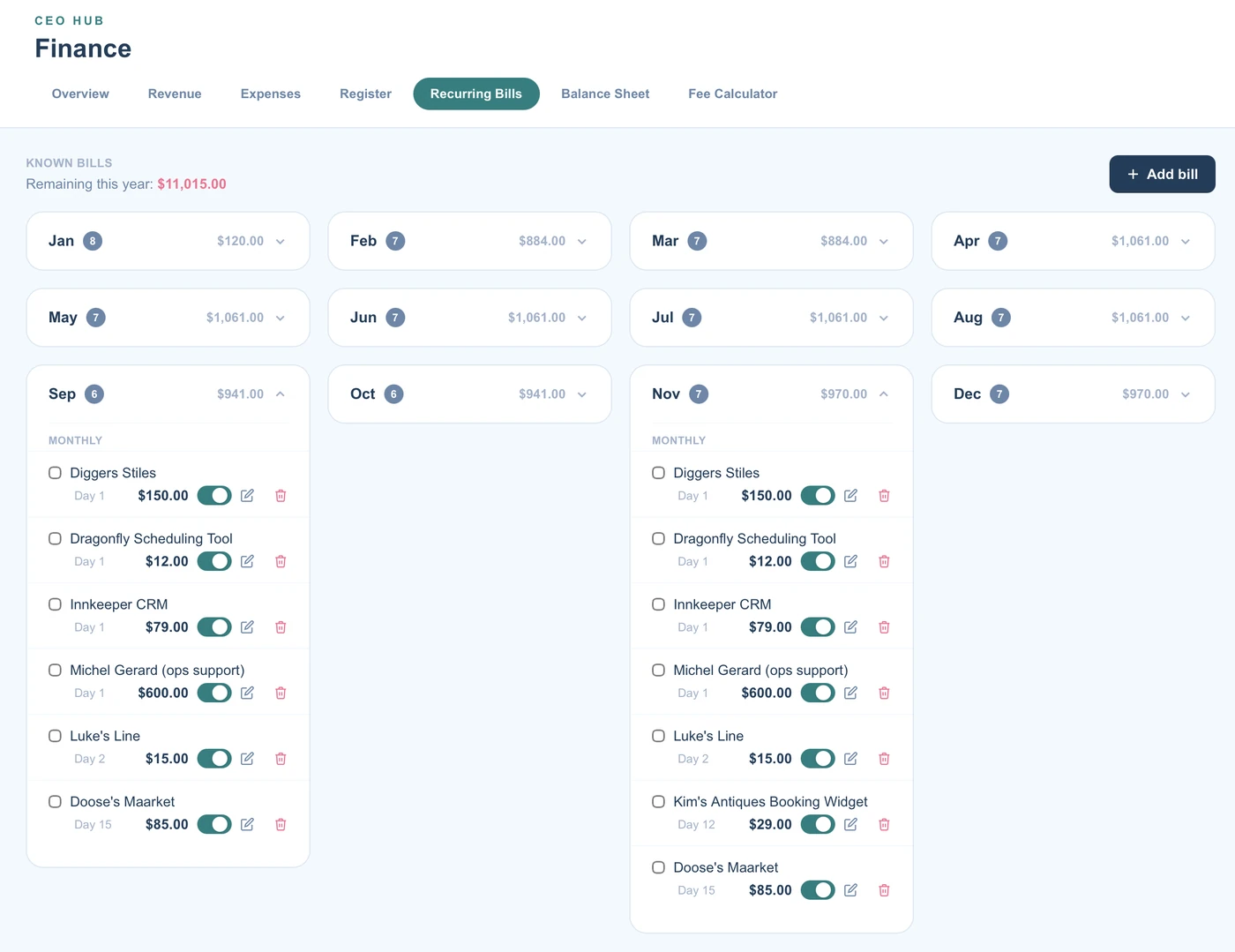
Revenue, expenses, and profit for the year, with an estimated tax figure, recurring bills by month, a balance sheet, and a fee calculator for the platforms you sell on. No spreadsheet to maintain.
- Year-to-date revenue, expenses, net profit, and estimated tax due
- Register: a checkbook-style ledger with a running balance you can check against your bank statement
- Split Entry: divide one purchase or refund across several categories
- Recurring bills organized by month, with a paid checkbox
- Balance Sheet with net worth calculated for you
- Fee Calculator for Etsy, Stripe, Squarespace, and more
- Import from CSV
Pipeline and Client Workflows
See who's coming, who's active, and what happens next.
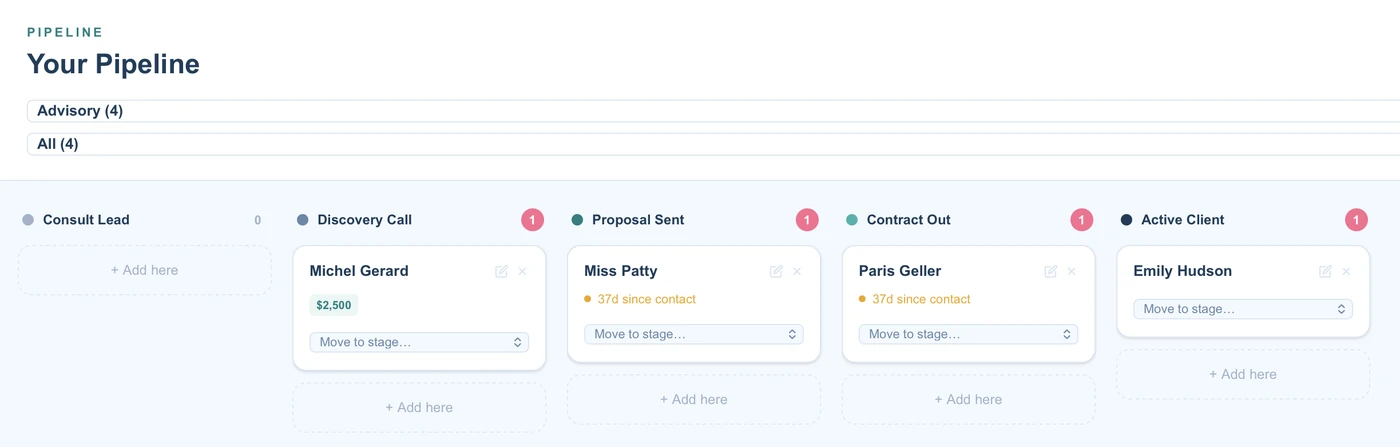
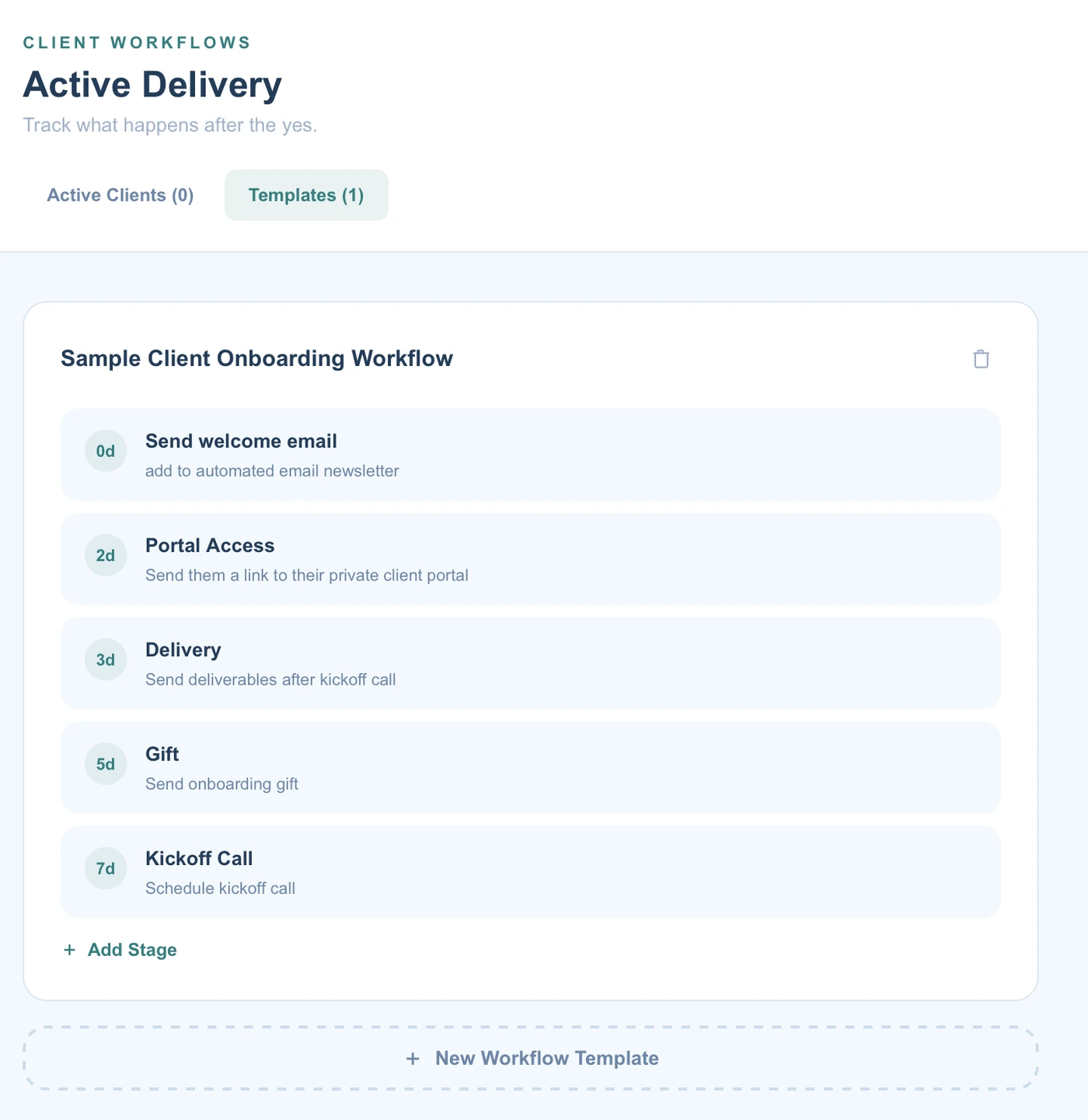
Track every lead through stages you define, see the revenue you could bring in, and once someone signs, walk them through a workflow that keeps delivery on schedule.
- Kanban pipeline with your own stages, separate for each service
- Potential Revenue: tag a lead to the program they're considering and see the total on your board
- Client Workflows: day-triggered steps that calculate due dates from each client's start date
- Duplicate any workflow, or save it as a reusable template
- Invoice and payment alerts that show the amount owed
- Start from a ready-made 7-phase client experience, then make it yours
- Rolodex: every client, collaborator, and contact in one directory
Visibility and Collabs
Know where every pitch and partnership stands.
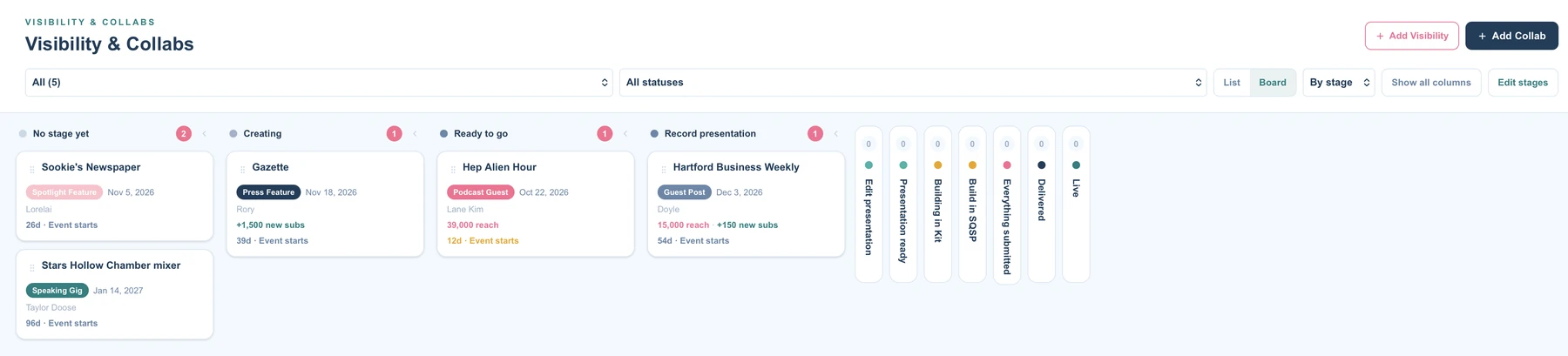
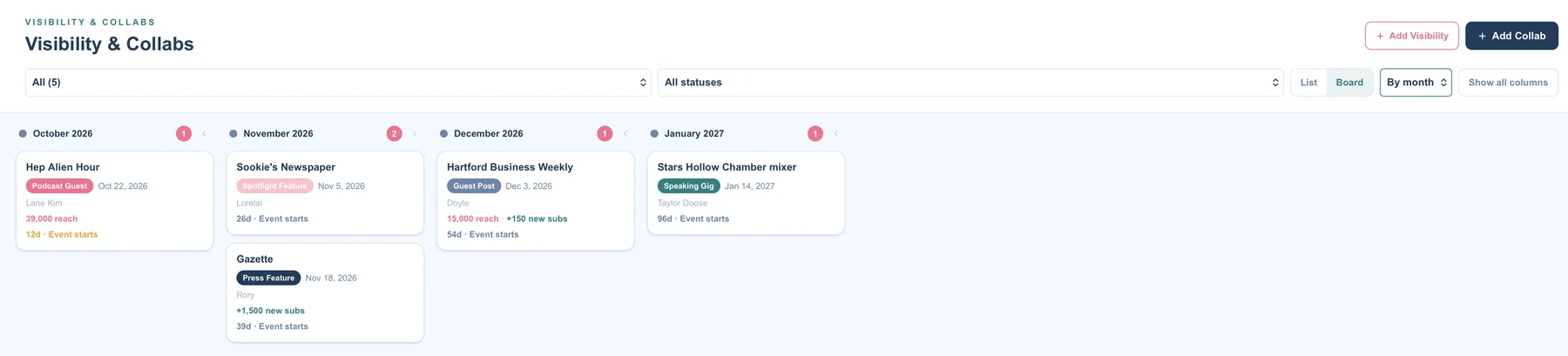
Track every podcast, summit, bundle, and swap from application to live, on a board you can group by stage or by event date.
- List or board view, grouped by stage or by month
- Drag an event to its next stage, and fold the stages you aren't using
- Make the stages your own: rename, recolor, reorder, add
- Reach, new subscribers, and new members for every event
- Finished events tuck themselves away
- Deadlines show up in Morning Brief and your calendar
Projects and the 12 Week Planning Wizard
Plan the quarter. Then run the week.
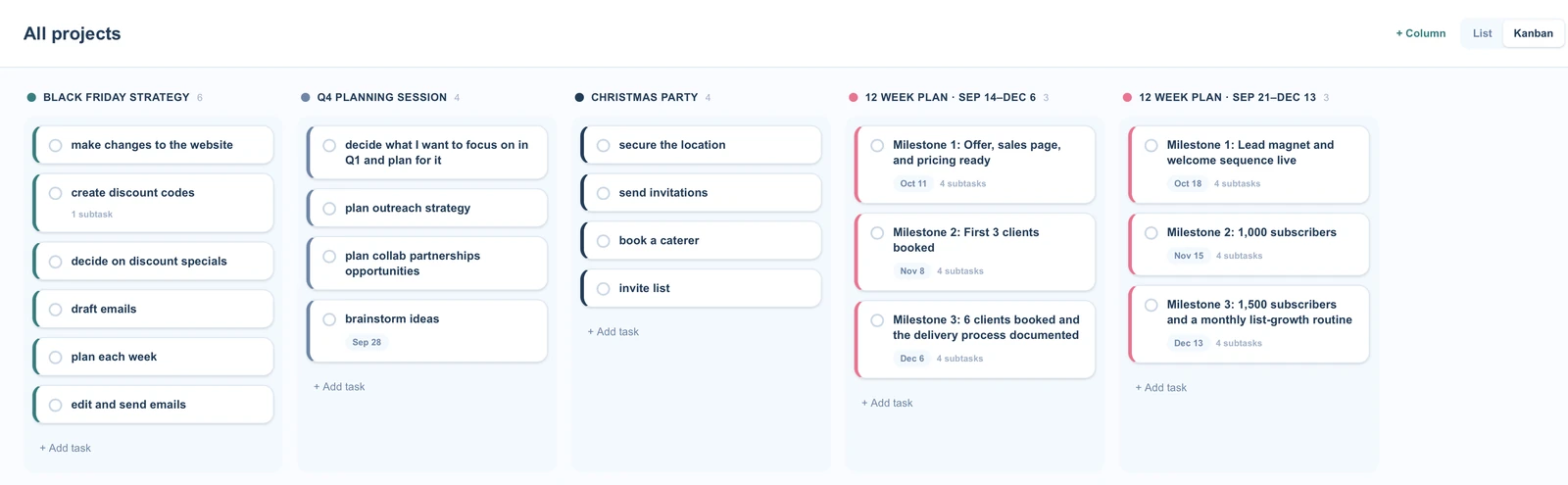
Keep projects moving on a lightweight board that lives next to your numbers, and plan your next 12 weeks with a guided wizard that turns one goal into weekly action.
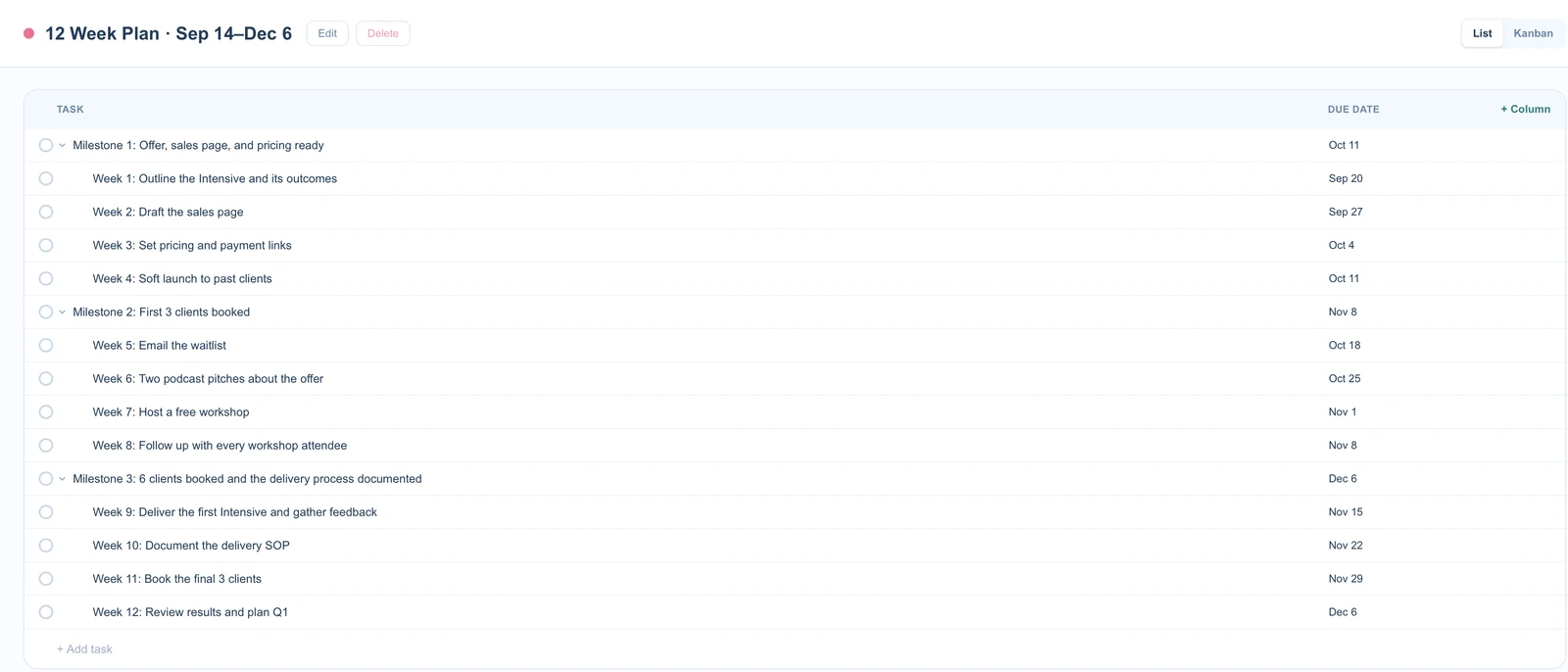
- A lined list for each project, plus a board of all of them
- Projects you name and color yourself
- Sub-tasks, custom columns, checklists, and file attachments
- Rich-text descriptions
- Dates show up on your VELA calendar, and can push to Google Calendar
12 Week Planning Wizard
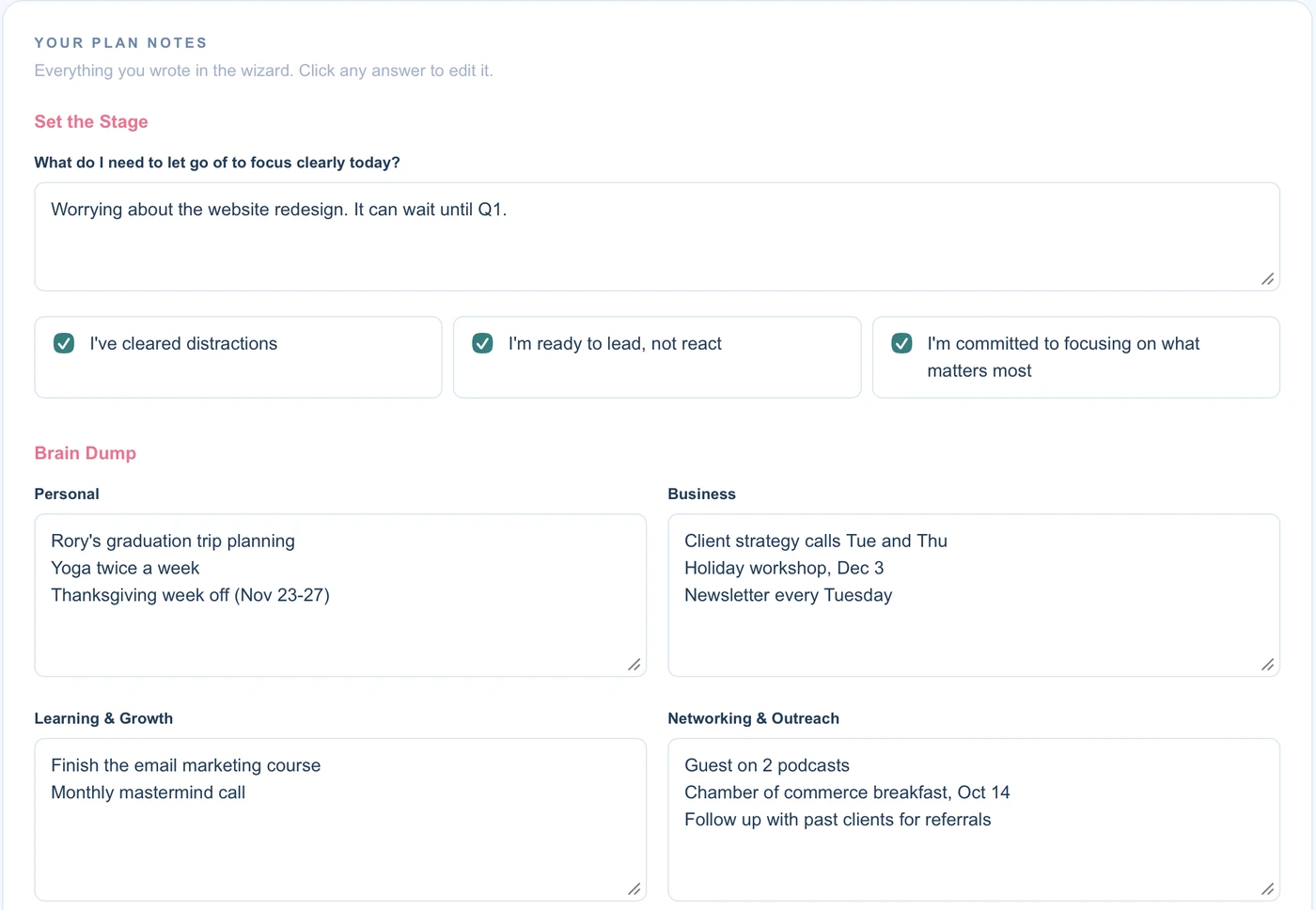
Walk through a guided setup: choose your 12-week focus, set three milestones, map your weekly actions, and decide how you'll review each week. Save and pick it back up anytime, and redo it whenever you start a new cycle. Your milestones and weekly actions show up in Morning Brief, Big Picture, and your calendar.
Systems Hub
Document how the business runs.
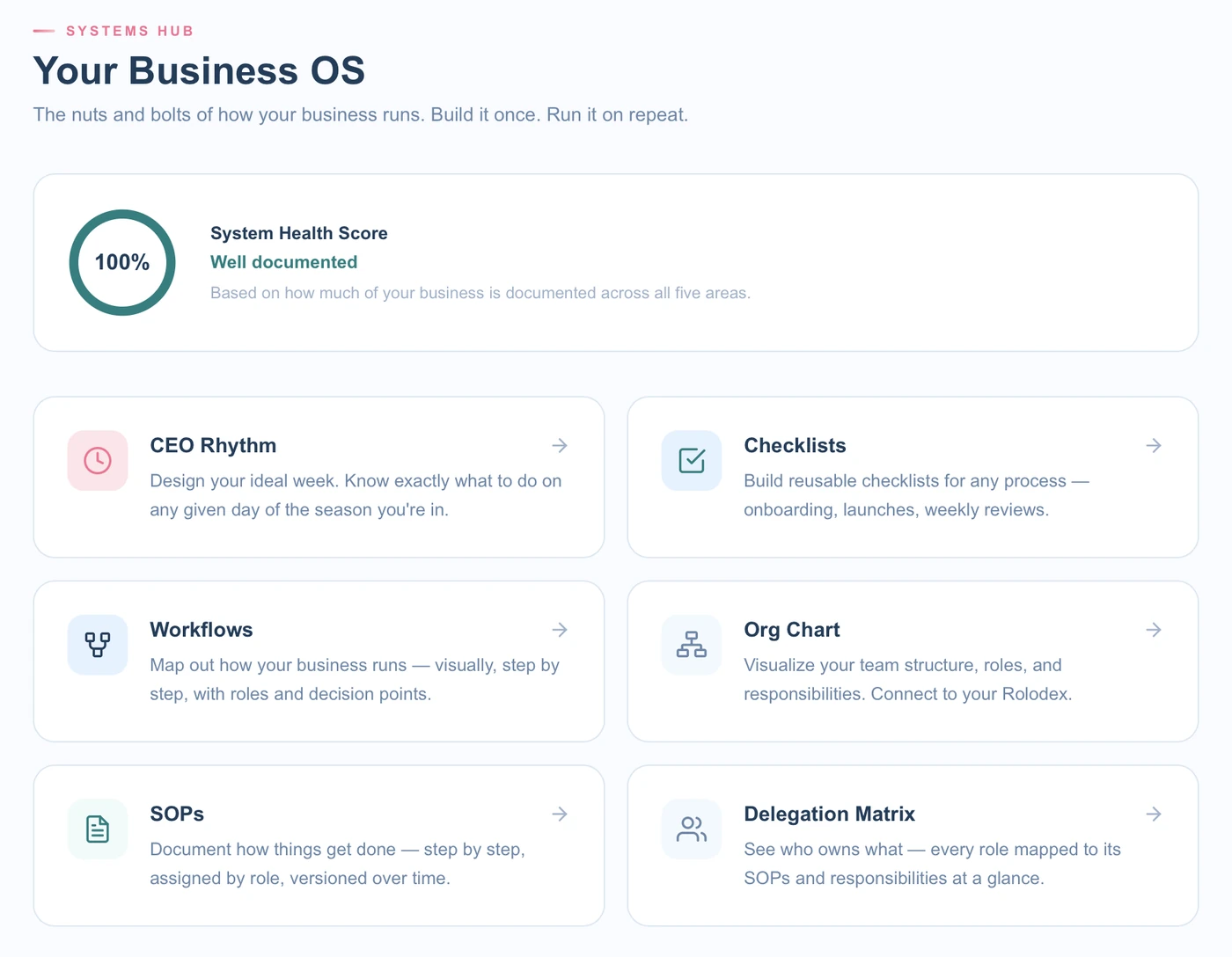
SOPs, checklists, workflows, your org chart, and a delegation map, all connected. Assign a role to an SOP and it appears on that role's card automatically.
- CEO Rhythm: your daily, weekly, and monthly routines
- Checklists you can reuse and reset
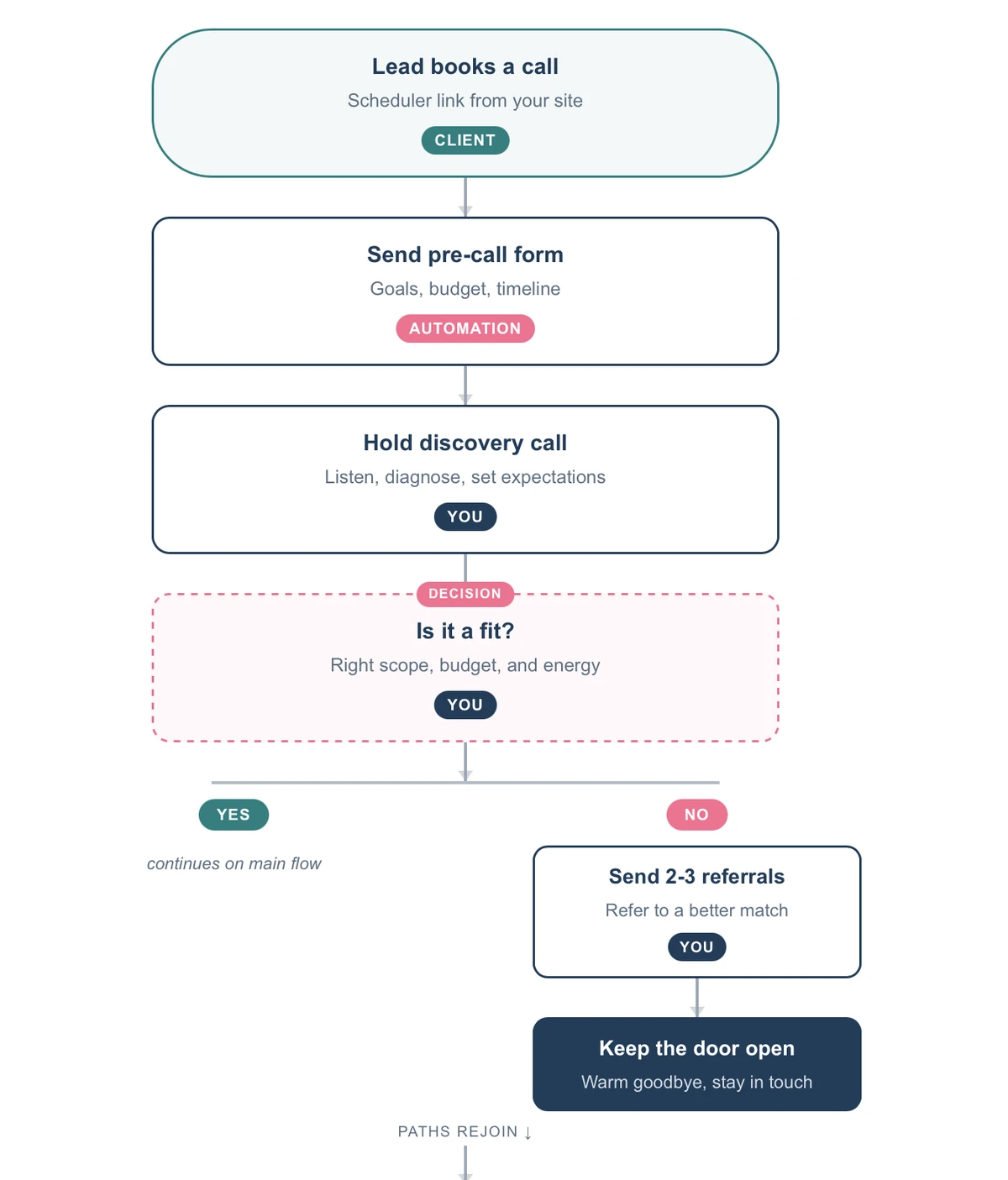
- Visual workflow maps you can export as a PDF
- SOPs with step-by-step procedures and starter templates
- Org Chart for human and AI team members
- Delegation Matrix showing what each role owns and where they are in training
- A System Health Score that shows how much of your operating backbone is documented
- Dictate items with your voice instead of typing
Everything else in the hub.
Big Picture
KPI cards, a six-month revenue trend, and revenue by program and by service.
Visibility and Collabs
Track every podcast, summit, bundle, and swap from application to live, with deadlines that show up in Morning Brief.
Calendar
Everything with a date on one calendar, with optional push to Google Calendar.
Notes
Quick notes and reminders you can dictate with your voice.
Programs
Track your offers, spots, and capacity.
10 built-in tools
Six assessments and four live trackers, no extra subscription.
Vela AI
The built-in guide on every page. Ask how anything works without leaving your hub.
Integrations
Stripe, Kit, ClickUp, Google Calendar, and Squarespace.
Built for the business you have now, and the one you're growing into.
Just getting started
Start with a solid foundation. Track income, log expenses, and keep your clients and projects in one place from day one. You don't need anything running before VELA is useful, and you can add sections as your business grows.
Already established
Bring what you already have into one view. VELA sits above the tools you use and shows the full picture, so you can stop rebuilding it in your head every week.
VELA works for coaches, consultants, OBMs, virtual assistants, designers, copywriters, strategists, and anyone who works with clients.
What people are saying
I really love how this wonderful tool does not replace but brings together all of our separate resources (project management, financial spreadsheets & planning, calendars & overall business strategy planning and management) into one cohesive & clean "30,000 ft" CEO overview... Perfect for a visionary CEO!... I think my favorite feature is how I can finally merge the "top tiers" of each of my resource platforms in one view, while eliminating the distractions of the tasks minutiae, so I can actually start seeing the big picture & start making big decisions confidently... This is what has been missing for me to fully stand in my "CEO-ness"!... ✨😎✨
 Denise, Website Design Services
Before VELA, so much of my business depended on me remembering to do things.
I was constantly trying to remember what needed attention, which clients needed follow-up, where we were financially, what projects were moving, and what systems still needed to be documented.
VELA has given me a place to bring all of that together.
Instead of carrying the entire business around in my brain, I can see it, understand it, and decide what needs to happen next. That shift alone has been incredibly valuable.
I was skeptical at first because the last thing I needed was another software subscription.
But VELA feels different because it isn’t trying to replace everything else. It pulls info in from the tools I already use and gives me the overview I’ve been missing.
My project management system can tell me what tasks need to get done. My calendar tells me where I need to be. My financial tools tell me what’s happening with the money.
VELA helps me connect the dots.
That’s the difference.
I’ve spent years building my business, but there were times when it still felt like I was chasing the business instead of leading it.
VELA changed that feeling for me.
Having everything connected (my numbers, clients, pipeline, projects, planning, and systems) gives me a sense of clarity and control that I didn’t have before.
For the first time, I can step back, look at the whole business, and ask the bigger CEO questions instead of getting pulled into the next task.
That perspective is priceless.
VELA has completely changed the way I look at my business. Before, I was jumping between my project management system, calendar, finances, client information, and a dozen other places just trying to figure out what was actually happening.
Now I can open VELA and see the business as a whole.
It gives me the information I need to make decisions instead of constantly reacting to whatever is screaming for my attention. I finally feel like I’m running the business from the CEO seat instead of being buried inside the business.
Ground Level Pricing
Lifetime access to VELA. $797, one time.
Get in at the ground level. Pay once and VELA is yours for life.
- Every feature in VELA today, including Projects, the 12 Week Planning Wizard, and Client Workflows
- Every feature we add from here on
- No monthly fees, no annual renewals, no price increases
- Priority support
$797
one time
Available Oct. 26 to Nov. 5.
After that, VELA is subscription only.
Regular pricing is $39/month or $397/year.
Lifetime pricing closes in
days
hrs
min
sec
Secure checkout with Stripe. Lifetime purchases are final and non-refundable.
VELA keeps growing, and lifetime members get every update.
A look at what's shipped recently.
- Projects: a lightweight project board with list and Kanban views
- Register and Split Entry: a checkbook-style ledger and multi-category purchases
- Visibility tracker: applications, deadlines, and a 10-step build pipeline for every podcast, summit, and bundle
- Anomaly Alerts: get told when an expense category or your revenue shifts, with an explanation and where to look
- Pipeline revenue forecasting: see the potential revenue sitting in your pipeline
- Recurring bills by month, with paid tracking
- Live Stripe and Kit notifications
- 12 Week Planning Wizard
- Client Workflows upgrades: duplicate, templates, and invoice alerts
Questions worth answering.
What is VELA?
VELA is a CEO operating hub for service-based businesses. It brings your revenue, pipeline, finances, clients, and projects into one view, alongside a built-in operating backbone for the business behind the numbers: SOPs, checklists, workflows, an org chart, and delegation tools. One hub, everything connected.
Who is VELA for?
Anyone running a service or program-based business at any stage: coaches, consultants, OBMs, virtual assistants, designers, copywriters, strategists, and membership owners. If you're just starting, VELA gives you a foundation from day one. If you're established, it pulls what you already have into one view. Either way, start with the sections you need and add more as you grow.
Do I have to use every feature?
No. Start with what's most pressing, like your pipeline, your revenue, or your Morning Brief. VELA shows what you've set up, so even two or three sections give you a clearer picture than separate tools do. Add more when you're ready.
What does lifetime access mean?
You pay $797 once and keep access to VELA for as long as it exists. No monthly fees, no annual renewals, no price increases. Every feature added in the future is included.
What happens after November 5?
Ground Level Pricing closes and VELA is available by subscription: $39 per month or $397 per year. Lifetime access is only available during this window.
What happens after I buy?
You'll create your VELA login using the email you paid with, and a short guided setup gets your hub ready. It asks for your name and business, the services you offer, and your revenue goal. It takes a few minutes.
Do I need to install anything?
No. VELA runs in your browser on any device. Create your account, log in, and your hub is ready. Nothing to download.
Is my data secure?
VELA uses row-level security on all your data and encrypted HTTPS connections, and your data is stored in the US through Supabase. Your numbers and client records are yours. We never share or sell them. You can export or delete your data anytime by emailing contact@virtuallystructured.com.
Can I get a refund?
Lifetime purchases are final and non-refundable. If you have questions before you buy, email contact@virtuallystructured.com and we'll answer them.
How is VELA different from the tools I already use?
Those tools help you manage the work: your clients, your tasks, your projects. VELA helps you run the business. Think of it as the CEO layer that sits above your other tools, where you see your revenue, track your pipeline, build your systems, and make decisions with real numbers. You don't use it to manage a client. You use it to manage the business that serves them.
I already use ClickUp, a calendar, and accounting software. Will I be entering everything twice?
No. VELA is your overview layer, not a replacement. ClickUp keeps managing your tasks in detail and your accounting software keeps your full books. VELA pulls what matters to the top: revenue, pipeline, capacity, and client health. Google Calendar, Stripe, Kit, and ClickUp connect directly, so events, sales, subscribers, and tasks show up without retyping. For finance, you log revenue and expenses to track your profit and monthly goal. It isn't a replacement for full bookkeeping.
Can I use the Org Chart and Delegation tools for an AI team?
Yes. The Org Chart, Delegation Matrix, and SOPs work for AI team members too. Add an AI assistant as a role, assign it responsibilities and SOPs, and document where it fits in your workflow.
Lock in lifetime access before November 5.
One payment. Every feature. Yours for life.
days
hrs
min
sec
Available Oct. 26 to Nov. 5. Regular pricing is $39/month or $397/year.